
Your Excel sheet says 12 units left. Shopee MY already sold 15 this week.

What Is Inventory Management Software in Excel?
Inventory management software in Excel is a spreadsheet-based system that tracks SKU counts, reorder points, and sales velocity using built-in formulas rather than a dedicated app. It is not a product you buy. It is a workbook you build, usually with one tab per channel or one master tab with a channel column, and formulas that total sales and flag low stock.
For a lot of Malaysian sellers, this is where inventory management actually starts. Before subscribing to Ginee, Sellercraft, or any other paid tool, most operators track their first 20 to 50 SKUs in Excel or Google Sheets because it is free, familiar, and fast to set up.
The question is not whether Excel can track inventory. It can. The question is how long it keeps working once you add a second marketplace, a second staff member, or a sale event that triples your order volume overnight.
How Do You Build an Inventory Tracking System in Excel?
A working Excel inventory tracker needs five columns at minimum: SKU code, product name, channel (Shopee MY, Lazada MY, TikTok Shop MY), current stock count, and reorder point.
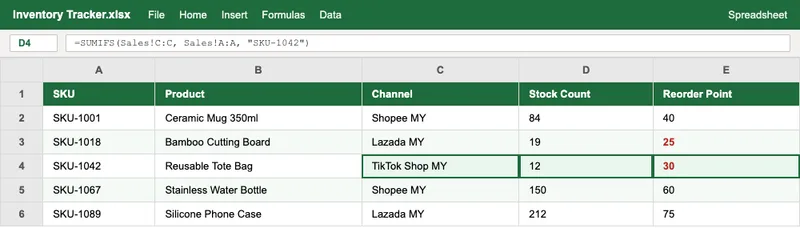
From there, the setup usually follows this order:
- List every active SKU in its own row, with a consistent naming format across channels. Inconsistent SKU codes (one channel uses dashes, another uses spaces) are the single most common source of tracking errors sellers report.
- Add a stock count column that you update manually after each sale, or import from a channel’s order export.
- Calculate a reorder point for each SKU using average daily sales multiplied by your supplier’s lead time, plus a safety stock buffer. The Association for Supply Chain Management documents this as the standard reorder point formula.
- Apply conditional formatting to highlight any row where stock count drops below the reorder point, so low-stock SKUs are visible at a glance instead of buried in a long list.
- Set a weekly review cadence. A tracker only works if someone actually opens it and acts on the flagged rows.
This gets you a functional single-channel tracker. Multi-channel tracking is where the formulas need to do more work.
Which Excel Formulas Do Malaysian Sellers Actually Need?
Three functions cover most of what an inventory tracker needs to do, according to Microsoft’s own function reference documentation.
| Function | What It Does | Where It’s Used |
|---|---|---|
| SUMIFS | Totals sales for a SKU across multiple channel columns or rows | Combined stock velocity across Shopee MY, Lazada MY, TikTok Shop MY |
| XLOOKUP (or VLOOKUP) | Pulls a SKU’s stock level or reorder point from a master list into a channel-specific sheet | Keeping per-channel sheets in sync with one source of truth |
| Conditional formatting with IF logic | Flags any row where stock count is below reorder point | Visual low-stock alerts without opening a separate dashboard |
SUMIFS is worth learning first. A formula like =SUMIFS(Sales!C:C, Sales!A:A, "SKU-1001") totals every sale of that SKU regardless of which channel column it came from, per Microsoft’s SUMIFS function documentation. That single formula replaces manually adding up numbers from three different marketplace seller dashboards.
XLOOKUP matters once you have more than one sheet. If your master SKU list lives on one tab and your Shopee MY orders live on another, XLOOKUP pulls the current stock count across without retyping it, cutting a common source of copy-paste errors.
Where Does an Excel Inventory System Break Down for Multi-Channel Sellers?
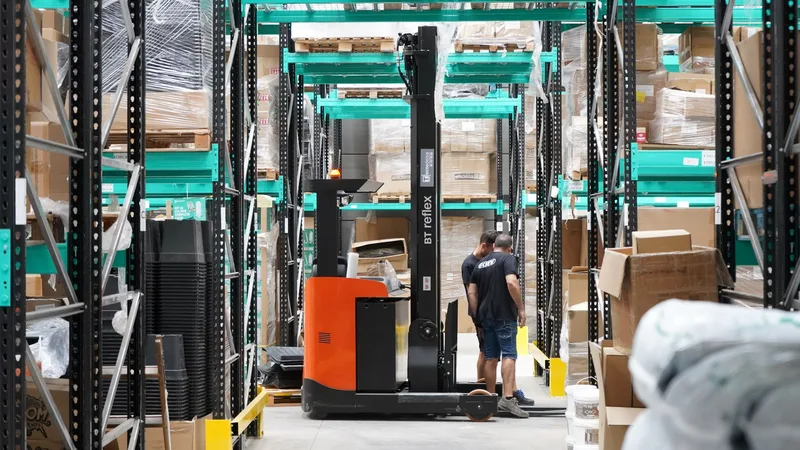
Excel has no concept of “right now.” Every number in the sheet reflects whatever was last typed in, not the actual live stock count on Shopee MY or Lazada MY at this second.
This creates a specific failure pattern for multi-channel sellers:
- Update lag. Between a Shopee MY sale happening and someone manually subtracting it from the Excel sheet, there is a gap. During that gap, a Lazada MY buyer can purchase the same physical unit, creating an oversell that requires order cancellation.
- Version conflicts. Once two or more staff members edit the same workbook, whoever saves last overwrites the other person’s stock updates, unless you are on a shared cloud version with real-time collaboration.
- No audit trail. A dedicated system logs who changed a stock count and when. A spreadsheet cell just shows the current number, with no record of what it was an hour ago or who edited it.
- Manual entry does not scale with order volume. Updating stock for a handful of daily orders takes a few minutes. During a Shopee MY 11.11 or Lazada MY 12.12 sale event, order volume can spike well above normal daily levels, and manual updates simply cannot keep pace.
Still tracking stock in Excel across Shopee MY and Lazada MY? Check whether your reorder timing actually holds up. Try the free reorder point calculator. 2 minutes. Free. No signup.
None of this means Excel is a bad tool. It means Excel was never built to solve a real-time, multi-user, multi-channel synchronization problem, and no amount of formula cleverness changes that.
When Should You Move From Excel to Dedicated Inventory Software?
The switch usually makes sense once one or more of these signals show up, based on seller community reports and patterns InventoryFlow has tracked across Malaysian multi-channel operators.
| Signal | Excel | Dedicated Software |
|---|---|---|
| SKU count | Manageable under ~100-150 | Handles hundreds to thousands |
| Real-time multi-channel sync | No, manual only | Yes, via API |
| Multiple staff editing simultaneously | Version conflict risk | Built-in permissions and audit trail |
| Setup effort | Low, build it yourself | Higher, connect each channel |
| Ongoing cost | Free | Typically from around RM 99/month, depending on tool and tier |
If you are seeing repeated overselling incidents, spending more than an hour a day on manual stock updates, or running three or more active sales channels, that is generally the point where dedicated software pays for itself in avoided stockouts and cancellations. For a full breakdown of which tools support Malaysian marketplaces and current pricing, see our comparison of inventory management software in Malaysia.
If you are still under that threshold, an Excel tracker with the formulas above, paired with the free reorder point calculator and a consistent SKU naming system, is a reasonable place to stay for now.

Frequently Asked Questions
Is Excel good enough for ecommerce inventory management?
Excel works for single-channel sellers tracking under roughly 100 SKUs, where manual updates stay manageable. Once you add a second marketplace like Lazada MY or TikTok Shop MY, the update lag between channels creates overselling risk that a spreadsheet cannot close on its own, no matter how good the formulas are.
Which Excel formulas do I need for inventory tracking?
SUMIFS totals sales by SKU and channel, XLOOKUP pulls stock levels by SKU code, and conditional formatting flags rows below your reorder point. Together these three functions cover most of what a basic inventory tracker needs, per Microsoft’s own function documentation.
Can I use a free Excel template for inventory management?
Yes. A basic template with SKU, channel, stock count, reorder point, and sales velocity columns covers single-channel tracking. It will not sync automatically with Shopee MY or Lazada MY order data, so every sale still needs a manual entry unless you build a custom import routine.
How many SKUs can you manage in Excel before it breaks down?
Sellers running under roughly 100 SKUs on one channel often manage fine in Excel. Past 150 to 200 SKUs across two or more marketplaces, manual entry lag and version conflicts between staff members typically start causing stockouts and overselling, based on seller community reports.
What replaces Excel for multi-channel inventory management?
Dedicated inventory software like Ginee or Sellercraft connects directly to Shopee MY and Lazada MY via API, syncing stock counts in real time as orders come in. This removes the manual update step entirely, which is the main failure point in an Excel-based system.